On this page
Why audit the server and not just the website
Most breaches we see in network penetration tests do not start with a clever zero-day. They start with a server that was built quickly and never revisited: SSH open to the world with passwords allowed, a Redis or Elasticsearch port listening on every interface, a cron job any user can edit, security updates left pending for months. Each one is a configuration problem, and each one is cheap to find before an attacker does.
External scanners only see what a server shows the internet. A configuration audit runs on the server and sees what a logged-in attacker would see: who has root, which binaries hand out a root shell, what is logged and what is not.
Run the audit in one command
- Linux or macOS. Open a terminal on the server and run the command below. It needs
sudoto read files such as/etc/shadowand the firewall rules. - Windows Server. Open PowerShell as administrator and run the Windows command below. It works on Windows Server 2012 R2 to 2025 and Windows 10 and 11.
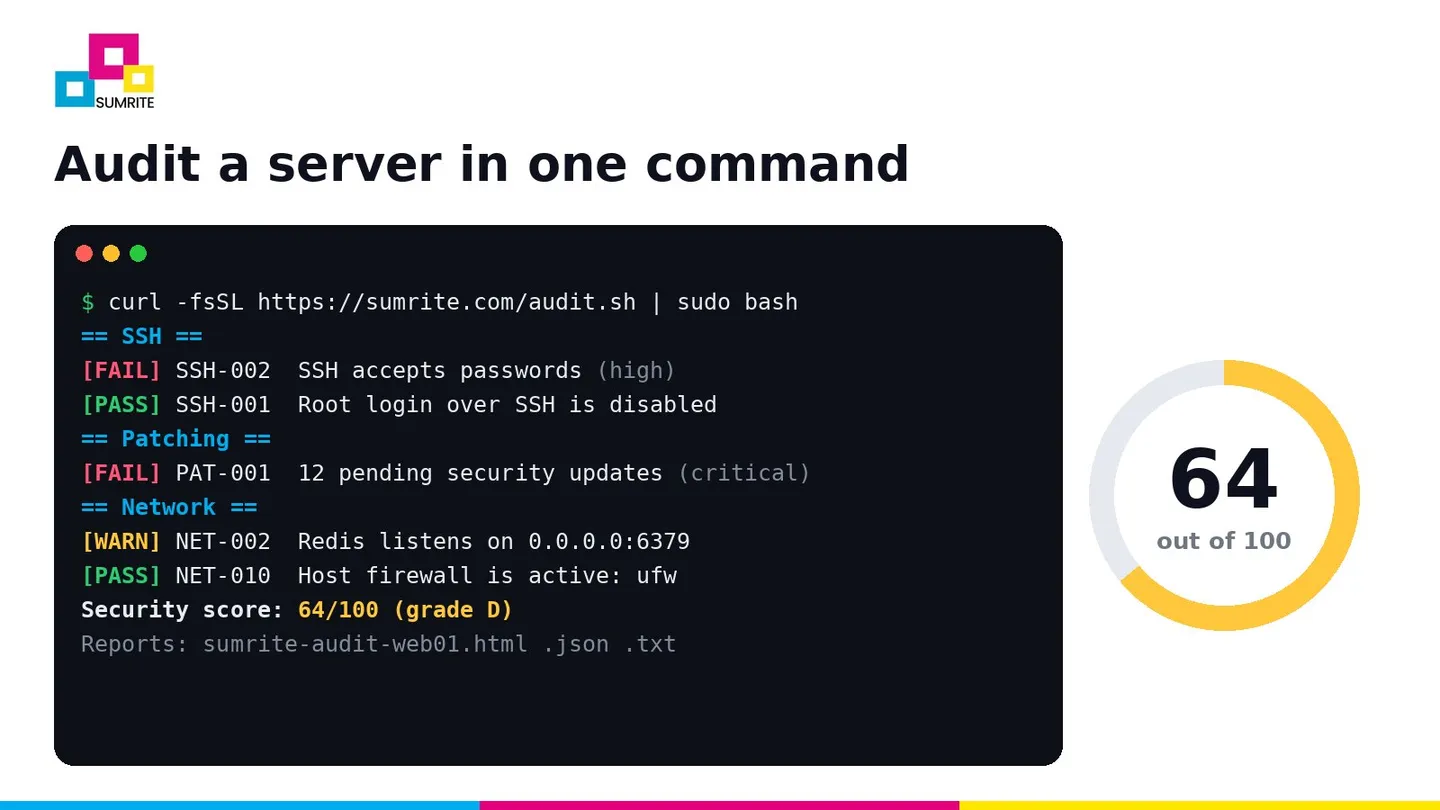
- Open the report. The script prints results as it goes and saves an HTML, JSON and text report in the current folder (on Windows, the Desktop).
# Linux and macOS
curl -fsSL https://sumrite.com/audit.sh | sudo bash

# No curl installed?
wget -qO- https://sumrite.com/audit.sh | sudo bash
# Windows Server, PowerShell as administrator
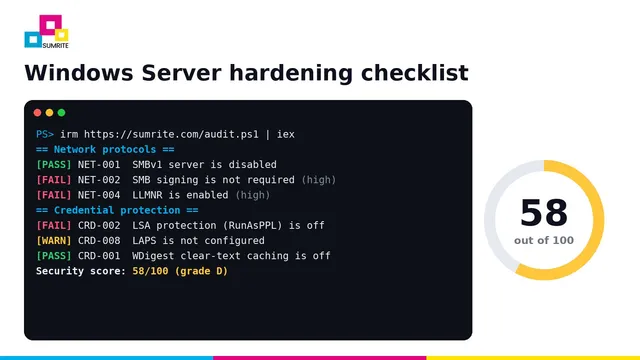
[Net.ServicePointManager]::SecurityProtocol = 'Tls12'; irm https://sumrite.com/audit.ps1 | iexProduction servers: read it first
Piping any script into a root shell means trusting where it came from. On production, download it, read it and check the checksum before you run it. It is one plain-text file.
curl -fsSLO https://sumrite.com/audit.sh
less audit.sh
sha256sum audit.sh          # compare with https://sumrite.com/audit.sha256
sudo bash audit.sh --output /root/audits
What the script checks
The Linux and macOS script runs about 80 checks and the Windows script about 70, grouped the way an attacker would work through a server.
- Patching
- Pending and security updates, reboot pending, automatic updates, end-of-life OS releases
- Remote access
- SSH root login, password logins, weak ciphers, MACs and key exchange; RDP with NLA; WinRM encryption
- Accounts
- Extra UID 0 accounts, empty passwords, weak hashes, NOPASSWD sudo, lockout, local admins, LAPS
- Privilege escalation
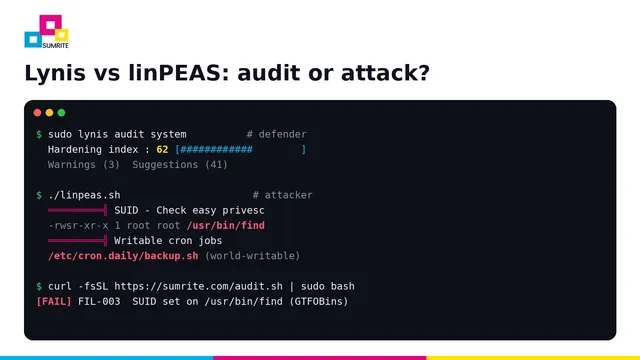
- SUID/SGID shells and interpreters (GTFOBins), root-equivalent capabilities, writable cron jobs, unquoted service paths
- Network
- Host firewall, databases on public interfaces, SMBv1, SMB signing, LLMNR, NetBIOS, TLS 1.0/1.1
- Kernel and platform
- ASLR, ptrace, eBPF, SELinux/AppArmor, Secure Boot, BitLocker, Defender, LSA protection
- Logging
- auditd, log forwarding, fail2ban, failed SSH or Windows logons with top source IPs, audit policy
- Services
- Telnet, FTP, CUPS, Print Spooler on DCs, Redis auth, Docker socket, version disclosure in nginx, Apache, PHP and IIS
Each finding is marked PASS, FAIL, WARN, INFO or SKIP, with a severity, the evidence it found and the exact command or setting that fixes it.
Reading the score
Every check carries a weight by severity: critical 10, high 6, medium 3 and low 1. A failure loses all of its points and a warning loses half. The score is the share of points kept, so 100 means nothing failed. One open critical finding caps the score at 69 (grade D), because a single critical issue such as an end-of-life OS, an empty password or a world-writable root cron job is usually enough on its own.
90-100
Grade A: well hardened
70-89
Grades B and C: gaps to close
Below 70
Grades D and F: fix this week
What to fix first
Start with the Fix these first list at the top of the HTML report: every critical and high finding that failed or warned. In our experience the same handful come up again and again.
- Pending security updates and end-of-life releases. No other hardening makes up for a kernel or OpenSSH with a public exploit.
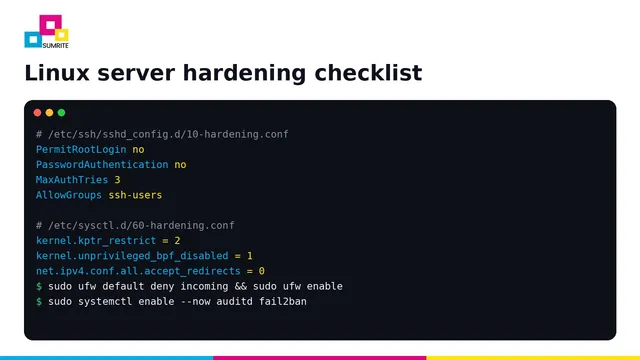
- SSH password logins and root login. Switch to keys, set
PermitRootLogin noand limit logins withAllowGroups. - Databases and caches on 0.0.0.0. Bind MySQL, PostgreSQL, Redis, MongoDB and Elasticsearch to localhost or a private interface.
- No host firewall. A cloud security group does not stop lateral movement from a compromised neighbour.
- SUID shells and writable cron jobs. These turn any low-privileged foothold into root in seconds.
- On Windows: SMB signing, LLMNR and LSA protection. These three decide how far an attacker gets inside an Active Directory network.
For the full list with commands, see the Linux server hardening checklist and the Windows Server hardening checklist.
Run it on a schedule
A single audit is a snapshot. Configuration drifts as people install packages, open ports for a quick test and forget to close them. Run the audit weekly and alert when the score drops.
# /etc/cron.d/sumrite-audit: every Monday at 06:15, keep reports in /var/log/sumrite-audit
15 6 * * 1 root curl -fsSL https://sumrite.com/audit.sh -o /usr/local/sbin/sumrite-audit.sh && bash /usr/local/sbin/sumrite-audit.sh --no-color --quiet --output /var/log/sumrite-audit --fail-under 80 || logger -t sumrite-audit "score below 80"
On Windows, create a scheduled task that runs powershell -ExecutionPolicy Bypass -File C:\Tools\audit.ps1 -Quiet -OutputDir C:\Audit -FailUnder 80. In CI, --fail-under and -FailUnder exit with code 2 below the threshold, so a golden image or AMI build fails if hardening regresses.
The JSON report is stable and easy to parse, so you can feed scores into a dashboard or SIEM.
Keep the reports as audit evidence
ISO 27001 Annex A 8.8 and 8.9, SOC 2 CC7.1 and PCI DSS Requirement 2 all ask you to show that systems are configured securely and that you check them regularly. A dated, scored report for each server, plus the re-run after fixes, is simple evidence that the control works. See ISO 27001 Annex A 8.8 technical vulnerability management for what auditors usually ask for.
What a script cannot tell you
A clean score means the operating system is configured well. It does not mean the server is secure. A script cannot judge whether your application has broken access control, whether a service account has more rights in Active Directory than it should, or whether three medium findings chain into a full compromise. That is what a penetration test is for.
Want a human to try breaking in?
Sumrite’s network and infrastructure VAPT tests your servers from outside and inside, the way an attacker would, with proof of exploit and a free retest. Get a quote.
Frequently asked questions
What is a server security audit?
A server security audit checks an operating system's configuration against hardening best practice: remote access, accounts and passwords, patch level, firewall, kernel and network settings, file permissions, logging and running services. It finds misconfigurations an attacker would use after getting a foothold, or to get one.
How do I run a free server security audit?
On Linux or macOS run: curl -fsSL https://sumrite.com/audit.sh | sudo bash. On Windows Server open PowerShell as administrator and run: irm https://sumrite.com/audit.ps1 | iex. The script is read-only, makes no network connections and writes a scored HTML, JSON and text report.
How often should I audit my servers?
Run an automated configuration audit at least weekly and after every major change, such as a new service, an OS upgrade or a firewall change. Add an expert-led penetration test at least once a year and after significant changes.
Is a server audit the same as a vulnerability scan?
No. A vulnerability scanner looks for known CVEs in installed software, usually from the network. A configuration audit runs on the server and checks how it is set up: who can log in, what is exposed, what is logged. You need both, and neither replaces a penetration test.
Is it safe to pipe a script from the internet into sudo bash?
Only if you trust the source. For production servers, download the script first, read it, compare its SHA-256 with the published checksum at sumrite.com/audit.sha256 and then run it. The Sumrite script is a single plain-text file under the MIT licence.